


01
Support leader
See where escalations happened, who helped, and why the final answer changed.
MergeYard Chat · Real-time ticket collaboration for Zendesk Support
MergeYard Chat gives Zendesk Support teams ticket-linked conversations, channels, DMs, threads, and quick handoffs inside the Zendesk workspace - so agents get help faster and leaders can see how complex tickets were resolved.
Inside the workspace
From ticket-linked discussions to threads, DMs, and quick call handoffs, MergeYard keeps the internal work connected to the customer issue.
01 / 08
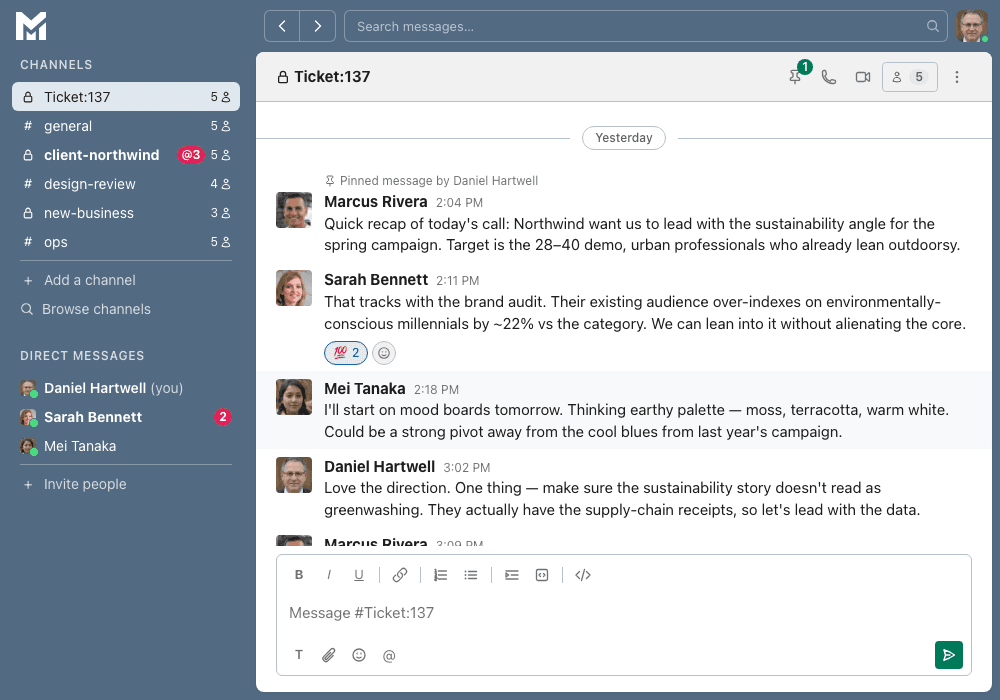
Ticket-linked channels
Each Zendesk ticket can have a dedicated internal discussion when your team needs to collaborate. Loop in teammates, share context, and keep the resolution close to the conversation.
Team fit
01
See where escalations happened, who helped, and why the final answer changed.
02
Add ticket-linked collaboration without replacing Zendesk, Slack, Teams, or Side Conversations.
03
Reduce scattered escalation history and make complex tickets easier to review.
04
Ask for help without leaving the ticket or losing the answer later.
05
Improve resolution quality while keeping internal decision context visible.
The problem
Agents ask for help in Slack, email, or side channels, then return to Zendesk with only part of the answer.
Support leads lose visibility into who helped, why the ticket changed direction, or how the final decision was made.
Support operations teams have to reconstruct escalation history across disconnected tools after the customer issue has already moved forward.
Operating model
Support teams do not just need another chat tool. When a Zendesk ticket needs internal help, the conversation behind the resolution matters. MergeYard keeps that discussion close to the ticket, so agents can collaborate in the flow of work and managers can review the context behind escalations, handoffs, and final decisions.
Dedicated internal discussions, channels, DMs, and threads connected to support work.
The handoff, decision, next step, and escalation context stay reviewable later.
Built for teams that already live in Zendesk Support and do not want another disconnected collaboration layer.
How it works
01
The customer issue stays the center of the workflow.
02
Create an internal conversation when the ticket needs help.
03
Use channels, DMs, threads, or quick handoffs to coordinate the answer.
04
The reasoning behind the resolution stays connected to the ticket.
What it does
MergeYard Chat helps teams coordinate internal work without splitting ticket context across disconnected tools and side channels.
Create a dedicated internal discussion for a Zendesk ticket when the team needs help resolving it.
Shared spaces for queues, incidents, launches, and operational coordination without moving work into a separate tool.
Reach the right teammate quickly when an agent needs a private internal conversation about a live issue.
Keep questions, follow-ups, and decisions organized so internal collaboration stays readable as tickets get more complex.
When enabled for a workspace, move a complex discussion into a live conversation without making calls the default workflow.
Pull in specialists, support leads, or adjacent teams and preserve the internal decision history connected to the ticket.
Use cases
MergeYard is built for the moments when a ticket needs more than a private note or a scattered Slack thread.
01
Keep the manager's decision tied to the ticket.
02
Pull in the right teammate without losing the troubleshooting trail.
03
Coordinate between agents, leads, and specialists in one internal thread.
04
Preserve who approved what, when, and why.
05
Keep agent notes, specialist comments, and next steps connected.
06
Move from chat to a quick call only when the situation needs it.
Why it matters
MergeYard Chat starts with Zendesk Support because that's where agents already work, escalate, and hand off issues. The goal: give teams a dedicated internal layer for support decisions without asking them to replace Zendesk.
01
Designed around Zendesk Support workflows.
02
Each customer workspace stays isolated.
03
Collaboration context stays focused on support workflow needs.
04
Review Security, Privacy, Terms, and Subprocessors before rollout.
Compare options
Slack and Teams are useful company-wide chat tools. Zendesk Side Conversations are useful for one-off side threads. MergeYard Chat focuses on persistent, Zendesk-native support collaboration tied to ticket work.
Simple per-agent pricing
MergeYard starts at $5 per Zendesk agent/month. For a 50-agent support team, that is $250/month. If the team saves just a few minutes per agent by reducing duplicate explanations, lost decisions, and manager follow-up, the value becomes easy to justify.
Next step
Open Zendesk Marketplace or book a short demo to walk through how MergeYard fits your support workflow.